


Start Selling
Start Selling at Kyeni Ensemble Guide
Thank you for choosing Kyeni Ensemble to be your online books marketplace! Kyeni Ensemble is a user-friendly platform, designed to give you the best online selling experience.
This manual describes the process of seller account registration, listing books on our platform, setting shipping cost, seller payment after your books get sold and many more.
You can access our services through the website or Kyeni mobile app. Download the app from Google Play (for Android) or App Store (for iPhone and iPad) users.


Seller registration on website (desktop, phone)
On Kyeni Ensemble website, click Sell Your Books to sign up and create seller account. Link: Seller Registration – Kyeni Ensemble

Sellers can register as an individual seller or as a registered business such as bookstores. You will receive an email to activate your seller account and provide account verification documents. You will receive email notification once your account is approved to begin selling.
Log In: Click the log in button to access your account at anytime. Link: My Account – Kyeni Ensemble

Seller Account (Dashboard)
From the seller dashboard, sellers can update account profile such as uploading profile photo, store highlights, payment options (where money earned from selling books will be deposited), add store refunds and returns policies, store discounts and deals, store opening hours and many more.
Listing Books using Mobile App
Listing books on our platform is easy, fast and free. All you need is to download our mobile app, Kyeni, and scan your book’s ISBN barcode.
Follow the steps below:
- Download Kyeni mobile app from Google Play for Android or from App Store for iPhone and iPad users.
- If you already have an account with us, simply log in into your account (the same login credentials used for website).
-
- This will take you to the account you created on the website.
- For new users, click sign up to create an account. You can also complete seller registration on the mobile app.
- On your seller account, go to General Setting and click on My Products, and proceed to Create Product
-
- Click on the camera icon to scan books ISBN barcode. This will auto-populate your book’s description details such as book author, publisher and title.
- Enter other book details such as book category, format and book condition from dropdown menu, and add book sale price.
- Take photos of your book or upload book photos under Image Gallery.
- Finally, click Post Product to complete book listing.
We recommend uploading multiple book images so that customers can get a better view of the book’s current condition. Add a short description of the book’s condition. For example, mention if the book is torn, or has missing pages or writings on the pages. In case there are book details not found by scanning ISBN barcode, type the details on respective fields.
Listing books without mobile app (website)
To list books without using the mobile app, go to the seller dashboard and click Products then Add New Products. Enter the book details, book images and complete other fields then click Save Product. You can also import products from CSV file. Click Import button for details.
Shipping cost
Sellers decide the cost of shipping books to buyers. The shipping cost field should be filled in at the time of listing books.
Setting shipping cost on seller dashboard
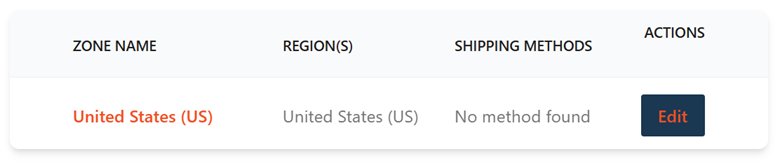
From the seller’s dashboard, go to the Settings and click Shipping then Edit under the Actions field. This will open page to specify your shipping preferences.
Shipping methods
Click on “Add Shipping Method” and select your preferred shipping method from the dropdown.

Free Shipping: Select if you want to offer free shipping.
Flat Rate: Enable sellers to set a fixed shipping rate for all books. Click Edit under Action field to enter the shipping cost.


Specify Cost as the cost of shipping one book, multiplied by the “quantity” of the books.
-
- For example, if the cost of shipping one book is 5 dollars, then the cost should be entered as: 5*[qty]. This will enable the system to add up shipping costs for the books sold per order.
Flat Rates Shipping Class Cost:
Shipping class enables sellers to assign different shipping costs depending on the book size. There are three classes: Large Books Shipping Class, Medium Books Shipping Class and Small Books Shipping Class.

-
- Enter the shipping cost as the cost of shipping one book, multiplied by the quantity of the books. See examples for Flat Rate.
Table Rate: Sellers can determine other shipping metrics such as minimum and maximum cost per order. Visit shipping Methods page from seller dashboard to learn how to set table rates.
Estimating shipping cost
You may visit shipping couriers websites such as USPS to check estimated shipping rates within the USA.
Shipping books to buyer
You will receive email notification when your book gets sold. Once your book is sold, go to the Shipping section on the seller’s dashboard to initiate shipping and complete shipping process. Package the book, go to your preferred shipping courier to purchase shipping labels and ship the book to the buyer.
Seller payment
Your earnings will be deposited in the bank account or PayPal account you provided during seller account registration. The bank account/ PayPal should have the same name as the seller’s name on our platform. For registered businesses, the bank account/ PayPal should have the business name not personal account. After your book gets sold, you will receive your earnings within 14 days. We take a facilitation fee of 14% of the total cost plus 0.50 USD per order. The facilitation fee includes payment processing fees through third parties. There are no hidden fees; the facilitation fee is standard across all payment methods. Additionally, your book is insured up to a maximum of 100 US dollars.
Kyeni Ensemble Selling Loop
|
Use the mobile app to scan book ISBN barcode and take book images. |
Once book gets sold, package the book ready to ship to the buyer |
|
Wrap the package with your preferred courier shipping label |
Ship the package to the buyer |


If you have any questions, please contact us at Contact us, or email us at: support@kyeniensemble.com